File threat analysis methods for cloud storage have become a top priority for any organization that relies on shared file repositories, SaaS platforms, or multi-tenant environments. Every file uploaded to a cloud bucket is a potential vector for malware, ransomware, or data exfiltration scripts. The challenge is real: attackers routinely disguise malicious payloads inside seemingly harmless documents, images, and archives.
For security-conscious developers and IT admins, understanding how to implement layered threat analysis isn't optional. It's the foundation of a defensible architecture.
This guide walks through four practical steps you can apply today to build robust file scanning into your cloud storage workflows. Whether you manage AWS S3, Azure Blob, or Google Cloud Storage, these methods apply across the board.
Key Takeaways
- Scan every file at the point of upload before it reaches persistent storage.
- Combine signature-based detection with heuristic and behavioral analysis for broader coverage.
- Automate quarantine workflows so malicious files never reach end users.
- Use metadata and file-type validation to catch disguised payloads early.
- Monitor detection metrics continuously to tune sensitivity and reduce false positives.
Step 1: Implement Upload-Time Scanning
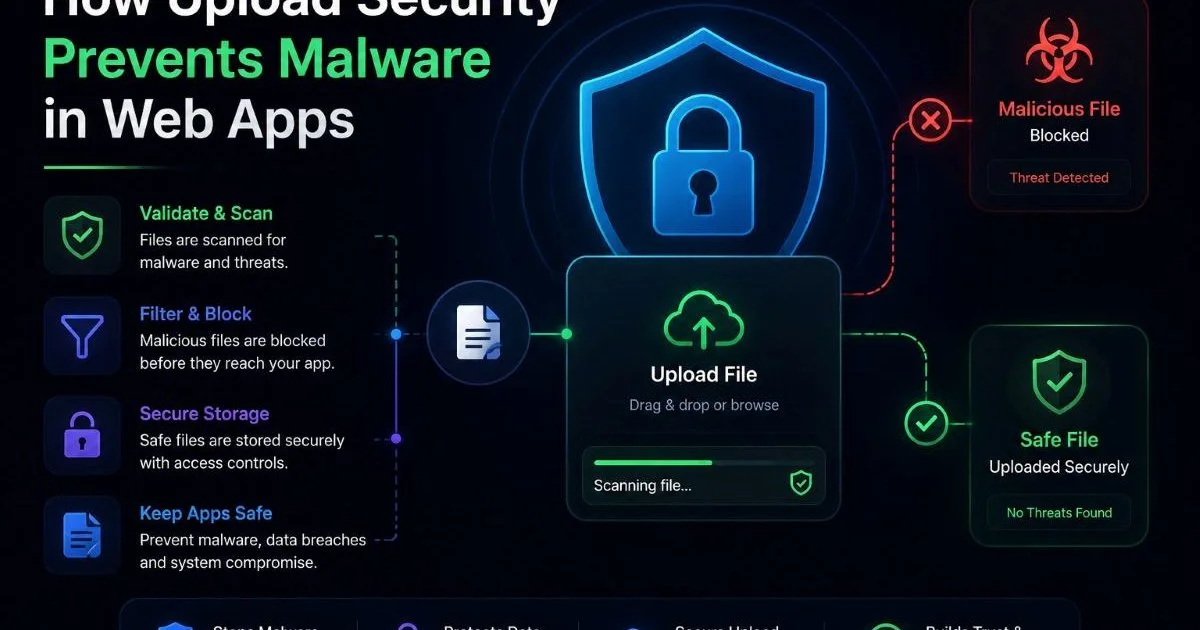
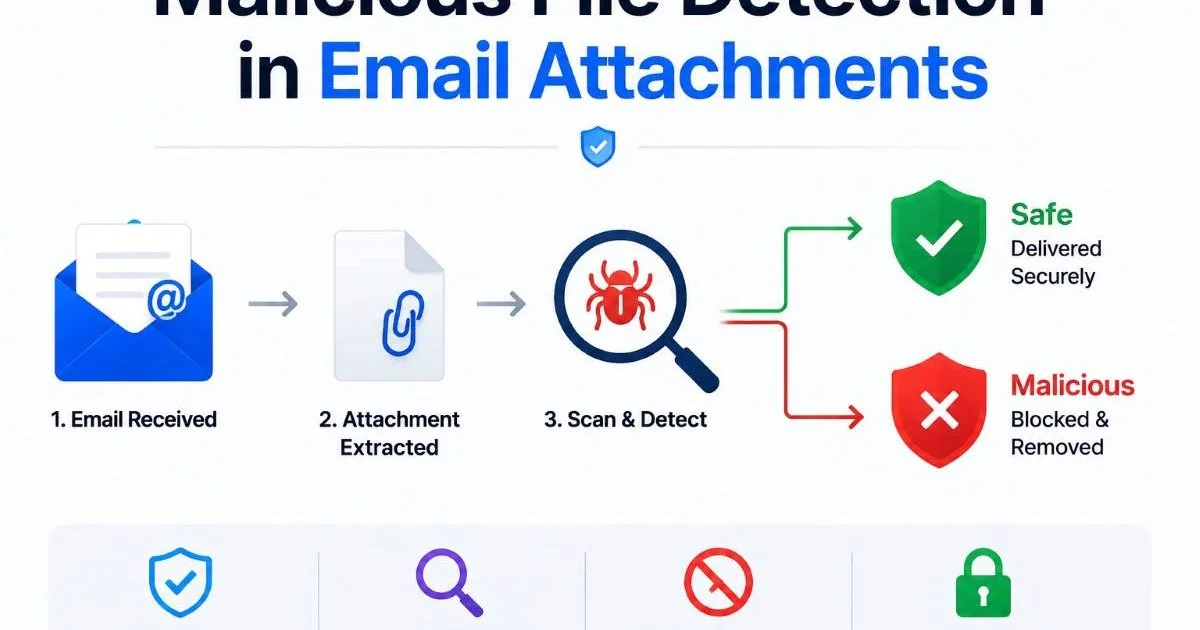
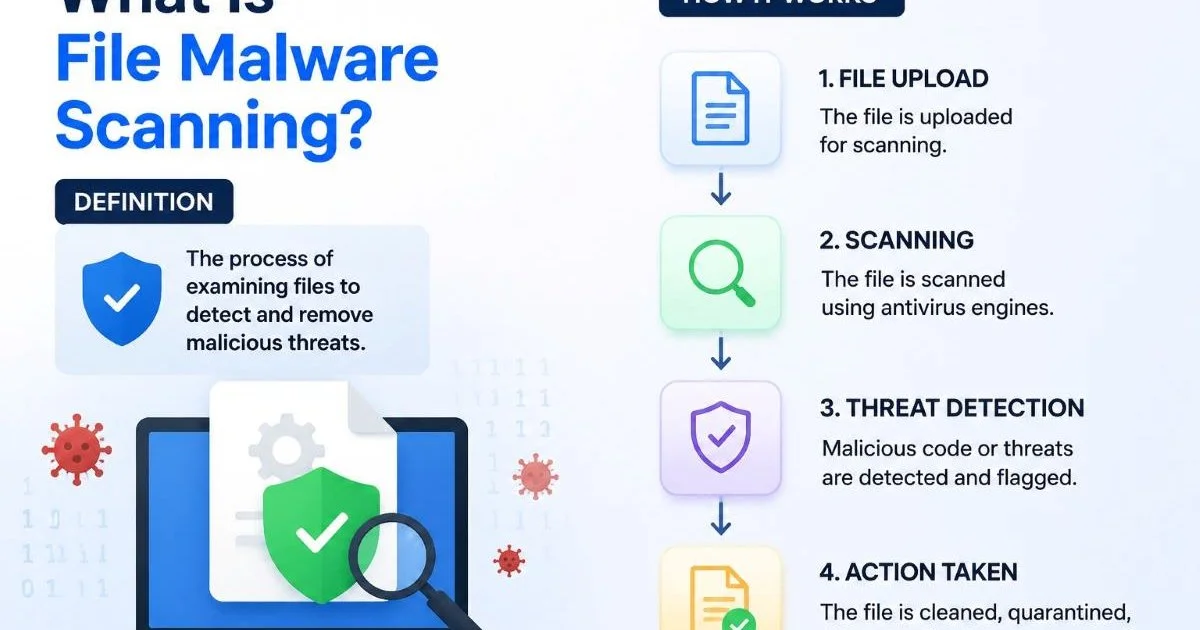
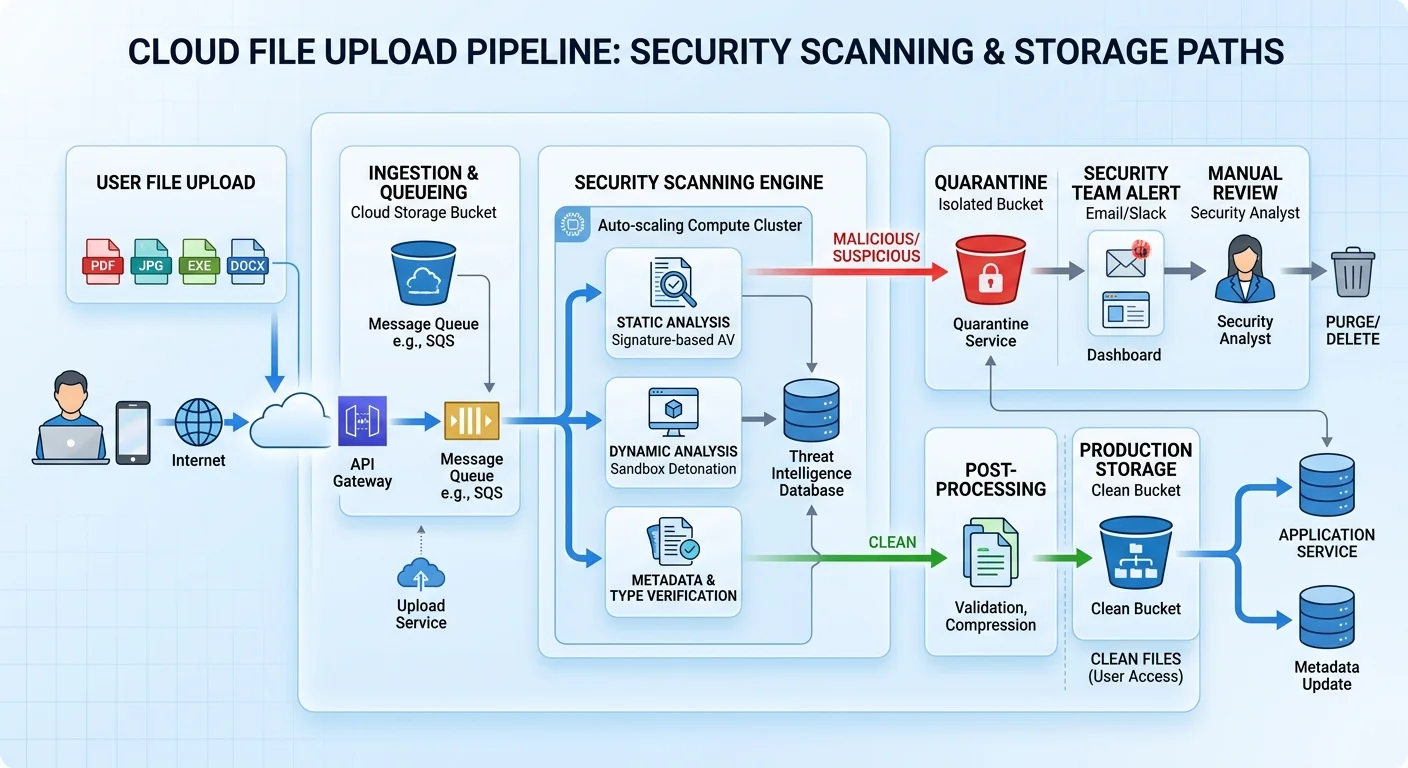
The single most effective place to catch a malicious file is the moment it enters your system. Upload-time scanning means intercepting every file before it lands in persistent cloud storage. In practice, this involves triggering a serverless function (like AWS Lambda or Azure Functions) on an object-creation event. That function passes the file to a scanning engine, and only after a clean verdict does the file move to its final bucket or container.
If you're new to the concept, understanding how file malware scanning works provides a solid foundation for the architecture decisions ahead. The core idea is straightforward: treat every incoming file as untrusted until proven otherwise. This zero-trust approach to uploads prevents malware from ever being served to downstream consumers, whether those are internal applications, partner integrations, or end users.
Configure your cloud event triggers to fire on ALL object creation events, including multipart uploads and copy operations.
Choosing a Scanning Engine
You have several options for the scanning layer itself. Open-source engines like ClamAV work well for basic signature matching and are free to deploy. Commercial APIs from vendors offer higher detection rates and more frequent signature updates. For many teams, the best approach is a hybrid: run ClamAV as a first pass, then escalate suspicious files to a more advanced engine. This balances cost with detection coverage and keeps latency reasonable for most upload workflows.
Handling Large Files and Archives
Large files and compressed archives deserve special attention. A 2 GB ZIP file can contain thousands of nested files, and attackers love using recursive compression (zip bombs) to overwhelm scanners. Set explicit limits on decompression depth and total extracted size. Three levels of nesting and a 500 MB extraction cap are reasonable defaults. Stream the extraction rather than loading everything into memory, and timeout the scan if it exceeds a threshold. These guardrails protect your scanning infrastructure from denial-of-service attacks disguised as file uploads.
Never skip scanning on large files simply because they exceed a size limit. Quarantine oversized files for async analysis instead.
Step 2: Layer Your File Threat Analysis Methods for Cloud Storage
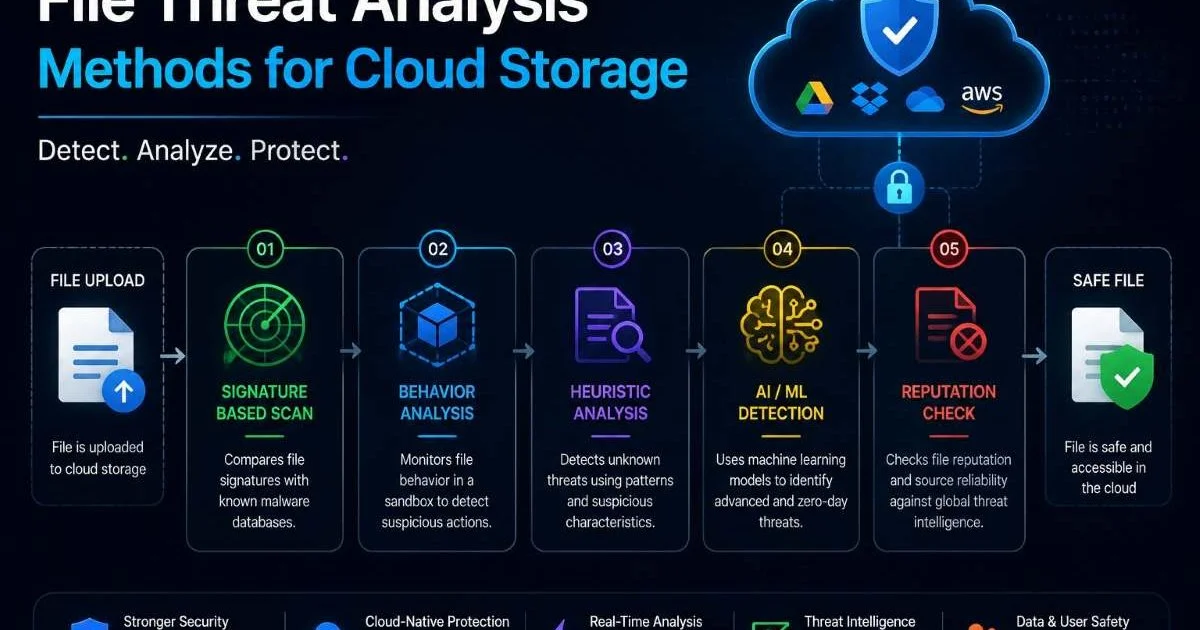
No single detection technique catches everything. That's why effective file threat analysis methods for cloud storage rely on multiple layers working in concert. Think of it as defense in depth applied to file security. Each layer catches threats the others miss, and the combination produces dramatically better results than any single approach.
Signature vs. Heuristic Detection
Signature-based detection compares file hashes and byte patterns against a known database of malware samples. It's fast and produces very few false positives, but it only catches known threats. Heuristic detection goes further by analyzing file structure, embedded scripts, and suspicious code patterns without needing an exact signature match. For example, a Word document containing a heavily obfuscated VBA macro that attempts to call PowerShell would trigger heuristic rules even if its hash has never been seen before.
Sandbox and Behavioral Analysis
For high-risk file types (executables, Office documents with macros, PDFs with embedded JavaScript), sandboxing provides the deepest level of analysis. The file runs in an isolated virtual environment while the system monitors its behavior: network calls, file system modifications, registry changes, and process spawning. If the file tries to download a second-stage payload or encrypt local files, the sandbox flags it immediately. Services like Joe Sandbox, ANY.RUN, and cloud-native solutions from major providers all support API-driven analysis.
The tradeoff is time. Sandbox analysis can take 30 seconds to several minutes per file, so it's not practical for every upload. Use it selectively based on file type and initial scan results. A good pattern is to pass files through signature and heuristic checks first, then route anything flagged as suspicious to the sandbox. This keeps your upload pipeline fast for the 99% of clean files while giving deep scrutiny to the rest. Integrating AI-powered document readers can also help parse and pre-classify files before they reach the sandbox stage.
"A single detection layer catches roughly 95% of known threats; adding a second layer pushes that above 99%."
Step 3: Automate Quarantine and Response
Detection without action is just logging. Once your scanning pipeline identifies a malicious file, you need automated workflows that quarantine the threat, notify stakeholders, and preserve evidence for investigation. Manual intervention should be the exception, not the standard path. Every second a malicious file sits in your production bucket is a second it could be accessed by a user or downstream service.
Building the Quarantine Pipeline
Set up a dedicated quarantine bucket (or container) with restrictive IAM policies. Only your security team and automated remediation processes should have access. When a scan returns a positive detection, your function should move the file to quarantine, strip any public access permissions, and log the event with full metadata: original uploader, timestamp, scan verdict, and matched rule or signature. This metadata becomes invaluable during incident response.
Keep quarantined files for at least 90 days. You may need them for forensic analysis or to retro-scan with updated signatures.
Notifications should flow through your existing incident management system. Send alerts to a dedicated Slack channel, PagerDuty service, or SIEM integration. Include enough context in the alert so the on-call engineer can triage without digging through logs. At minimum, include the file name, hash, detection engine verdict, and upload source. For organizations subject to compliance requirements, automated quarantine also helps satisfy audit controls around data integrity and malicious content handling.
Consider building a feedback loop as well. When your security team reviews quarantined files and determines a false positive, that verdict should feed back into your scanning configuration. Whitelist specific file hashes or adjust heuristic thresholds so the same false positive doesn't recur. Over time, this feedback loop dramatically improves the accuracy of your pipeline. Documenting your audit processes step by step helps maintain consistency as team members rotate through security review duties.
Step 4: Monitor, Tune, and Audit
Deploying file threat analysis methods for cloud storage is not a one-time project. Threat landscapes shift constantly, and your scanning infrastructure needs ongoing attention. Monitoring gives you visibility into how your pipeline is performing. Tuning keeps detection rates high while minimizing false positives. Auditing proves to stakeholders and regulators that your controls actually work.
Key Metrics to Track
Start with a dashboard that tracks the metrics below. Review them weekly with your security team, and set alerts for anomalies. A sudden spike in detection rates might indicate a targeted attack. A drop in scan volume could mean your event triggers are misconfigured. Both scenarios require investigation.
Tuning is an ongoing process. Every quarter, review your heuristic rules and sandbox configurations against the latest threat intelligence feeds. Are new file-based attack techniques emerging? Are attackers shifting from macro-laden Office documents to ISO and LNK files? Adjust your file-type prioritization accordingly. What was a low-risk file type last year might be a preferred attack vector this year.
Auditing closes the loop. Run periodic tests by uploading known malware samples (EICAR test files, controlled samples from malware repositories) to verify that your pipeline detects and quarantines them correctly. Document these tests with timestamps and results. Many compliance frameworks, including SOC 2, ISO 27001, and HIPAA, expect evidence that your security controls are tested regularly. Automated testing scripts that run monthly and report results to your SIEM make this nearly effortless to maintain.
Use the EICAR test string to validate your scanning pipeline without handling real malware. It triggers detection in virtually all AV engines.
Finally, keep your scanning engines updated. Signature databases go stale within hours if not refreshed. Configure automatic updates at least every four hours for signature-based engines. For heuristic and behavioral engines, subscribe to your vendor's release channel and test updates in a staging environment before rolling them to production. An outdated scanner is almost as dangerous as no scanner at all, because it creates a false sense of security.
Frequently Asked Questions
?How do I trigger upload-time scanning on multipart S3 uploads?
?Is ClamAV alone sufficient or do I need a commercial scanning API?
?What are reasonable decompression limits to stop zip bomb attacks?
?Does upload-time scanning add noticeable latency for end users?
Final Thoughts
Implementing file threat analysis methods for cloud storage requires deliberate architecture, not afterthought bolt-ons. Scan at upload time, layer multiple detection techniques, automate your quarantine response, and commit to ongoing monitoring and tuning.
The threats will evolve, but a well-built pipeline adapts with them. Start with the fundamentals outlined here, measure your results, and iterate. Your users and your compliance auditors will both thank you.
Disclaimer: Portions of this content may have been generated using AI tools to enhance clarity and brevity. While reviewed by a human, independent verification is encouraged.