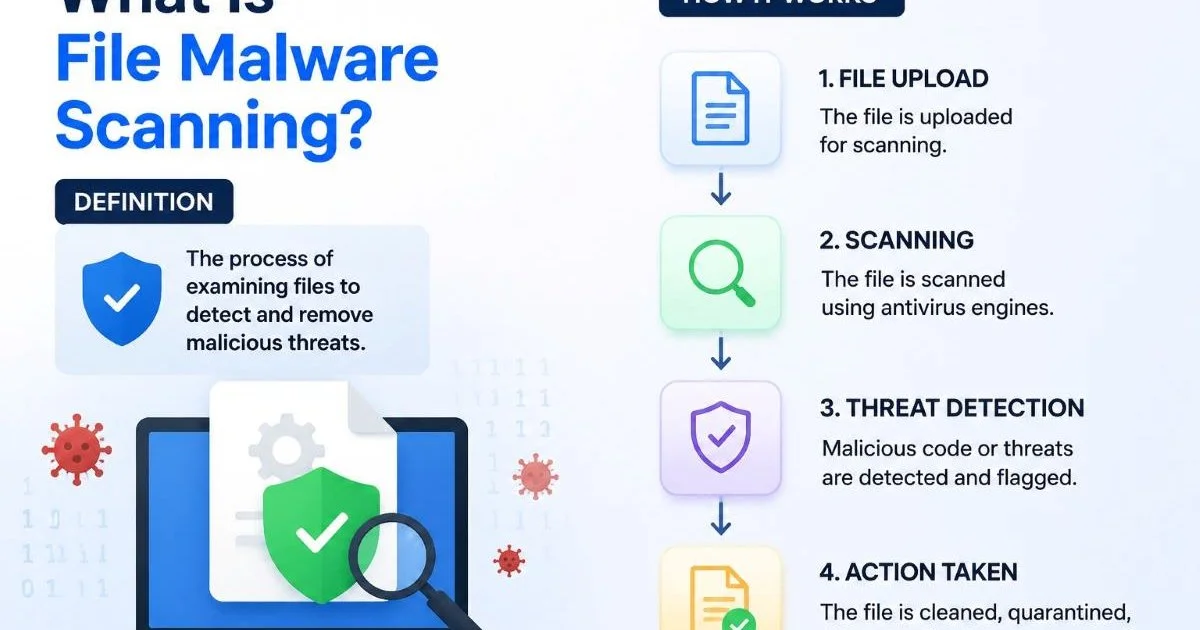
File malware scanning is the process of analyzing uploaded files to detect malware signals, suspicious patterns, risky scripts, and common security threats before they can compromise a system. For security-conscious developers and IT administrators, this practice sits at the foundation of any serious upload security strategy. Every file that enters your infrastructure through a web form, API endpoint, or internal tool carries potential risk.
A single malicious PDF, disguised image, or weaponized script can escalate into a full-blown breach. The volume of file-based attacks continues to grow year over year, and attackers are getting more creative with obfuscation techniques.
Understanding what file malware scanning actually involves, how the technology works under the hood, and where common blind spots exist gives you a real advantage in building resilient systems.
Key Takeaways
- File malware scanning inspects uploaded content for known threats, suspicious behavior, and risky code.
- Signature-based detection alone misses zero-day exploits and polymorphic malware variants entirely.
- Heuristic and behavioral analysis layers catch threats that static signature databases cannot identify.
- Every upload endpoint in your application is a potential attack vector worth protecting.
- Combining multiple detection methods produces significantly higher catch rates than any single approach.
What Is File Malware Scanning and How Does It Work?
Signature-Based Detection
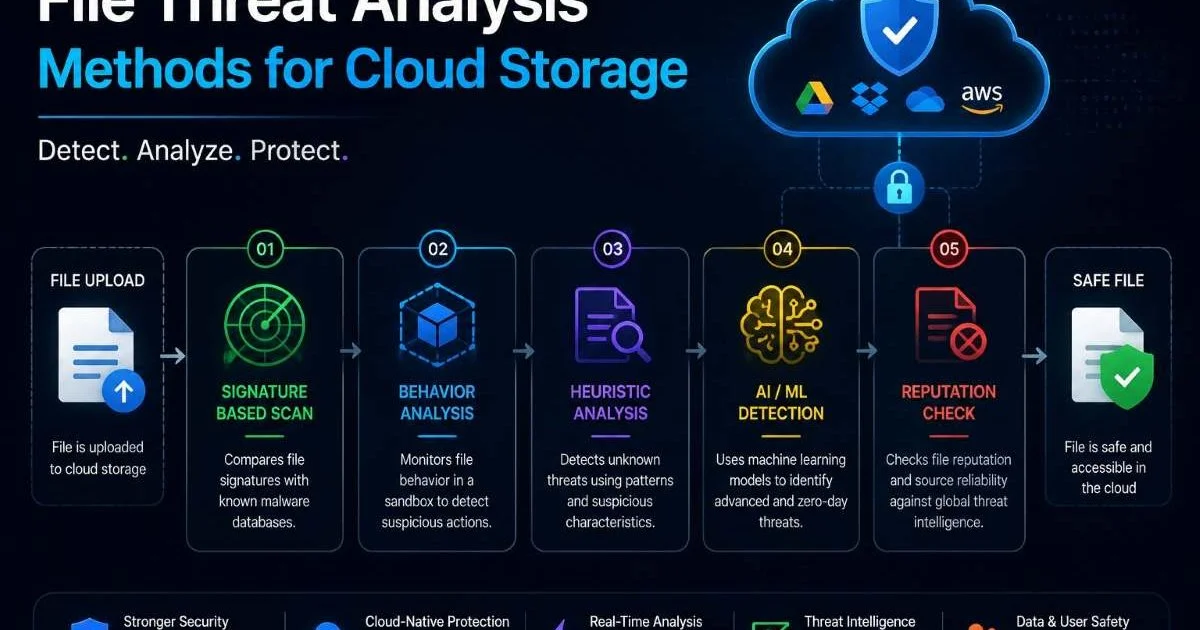
At its most basic level, file malware scanning compares uploaded files against a database of known threat signatures. These signatures are essentially fingerprints: unique byte sequences, hash values, or structural markers associated with previously identified malware. When a file matches a known signature, the scanner flags it immediately. This approach is fast and reliable for catching well-documented threats, and it forms the backbone of most commercial threat detection software on the market today.
The limitation is obvious. Signature databases are inherently reactive. A brand-new piece of malware, often called a zero-day threat, won't appear in any signature database until researchers identify and catalog it. Polymorphic malware makes this worse by altering its own code each time it propagates, generating new signatures with every iteration. Relying solely on signature matching is like locking your front door while leaving every window open.
Heuristic and Behavioral Analysis
Heuristic analysis addresses the gaps in signature-based scanning by examining what a file does rather than just what it looks like. The scanner decompiles or emulates the file in a sandbox environment, watching for suspicious file patterns such as attempts to modify system registries, establish outbound network connections, or inject code into running processes. This method catches threats that haven't been formally cataloged yet, making it a stronger defense against novel attacks.
Script security analysis takes this further by parsing embedded code within documents, PDFs, and office files. Macro-based attacks in Excel spreadsheets and JavaScript payloads hidden in PDFs remain popular attack vectors precisely because many basic scanners skip deep content inspection. A thorough scanning engine will deobfuscate scripts, analyze control flow, and flag behaviors like encoded PowerShell commands or suspicious API calls that indicate malicious intent.
Why Upload Security Scanning Matters for Modern Applications
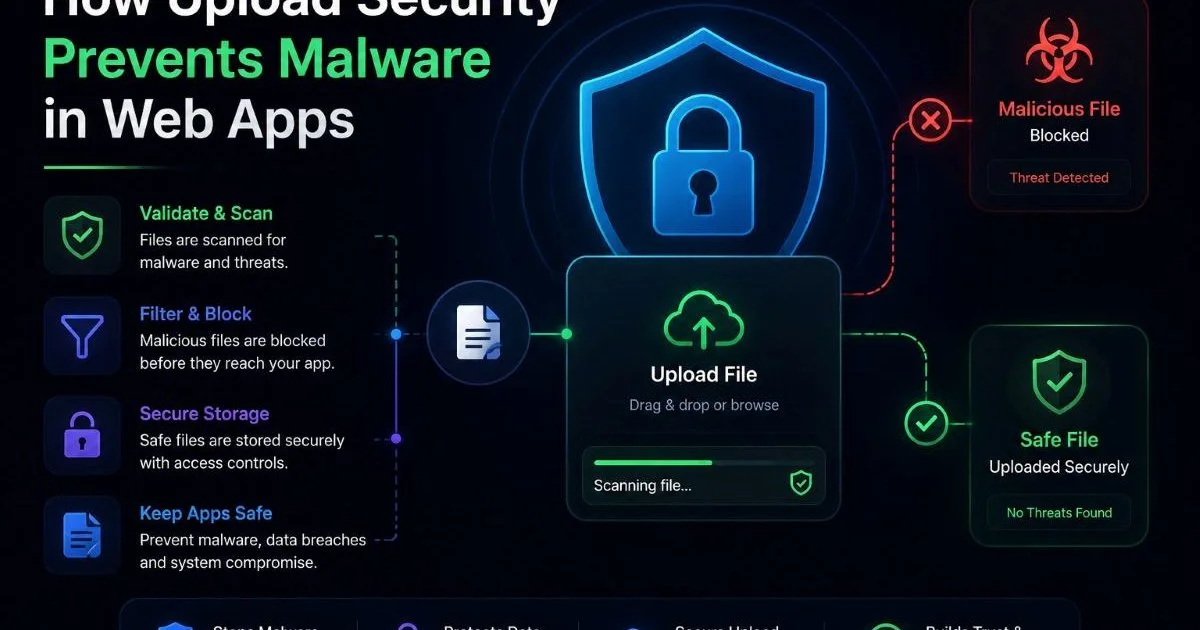
Any application that accepts file uploads from users, whether a healthcare portal receiving patient documents, a SaaS platform processing CSV imports, or a simple contact form with an attachment field, exposes itself to file-based attacks. Upload security scanning is the gatekeeper that prevents malicious content from reaching your storage, processing pipelines, or end users. Without it, you are essentially trusting every user who interacts with your system.
The consequences of skipping this step are well-documented. In 2023, the MOVEit file transfer vulnerability led to breaches at over 2,600 organizations globally, exposing data belonging to more than 77 million individuals. The attack exploited weaknesses in how uploaded files were processed and stored. Even organizations that thought they had adequate protections found their scanning configurations were insufficient against the specific techniques used by the Clop ransomware group.
Beyond preventing direct attacks, file malware scanning supports compliance requirements. Regulations like HIPAA, PCI DSS, and GDPR either explicitly require or strongly imply that organizations must scan incoming data for threats. The operational benefits of document scanning extend beyond security into workflow efficiency and audit readiness. For IT admins managing enterprise environments, a well-configured scanning pipeline reduces incident response burden and keeps your security posture audit-friendly.
"Every upload endpoint in your application is an attack surface, not a feature."
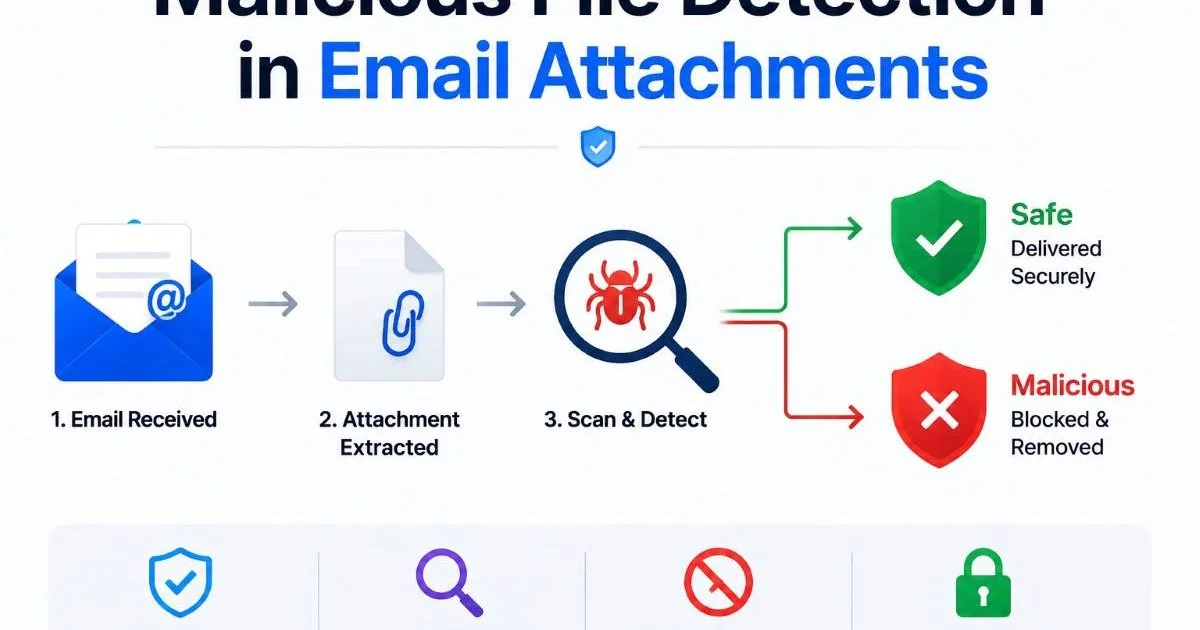
Consider the practical scenarios: a recruitment platform where candidates upload resumes as Word documents, a legal firm accepting case files from clients, or an e-commerce site where sellers upload product images. Each of these represents a real entry point for weaponized files. Malware detection tools applied at the point of upload stop threats before they propagate through internal systems, reach databases, or get served back to other users.
Never rely on client-side file type validation alone. Attackers can trivially spoof MIME types and file extensions.
Common Misconceptions About Malware Detection Tools
One of the most persistent myths is that antivirus software and file malware scanning are the same thing. Traditional antivirus runs on endpoints, scanning files already present on a device. Upload scanning operates at the network or application layer, intercepting files before they reach any endpoint. The scanning context is different, the threat models differ, and the performance requirements are distinct. Treating them as interchangeable leaves significant gaps in your security architecture.
Another misconception is that file type restrictions eliminate the need for scanning. Developers sometimes whitelist only image formats like PNG and JPEG, assuming this prevents malicious uploads. In reality, attackers embed payloads within valid image files using techniques like polyglot files (files that are simultaneously valid in two formats) or steganography. A file can pass extension and MIME type checks while still containing executable code. Similarly, when evaluating your site's link structure, you might audit your anchor text profile to catch hidden issues; the same principle of looking deeper applies to file uploads.
Polyglot files can be valid JPEGs and valid ZIP archives simultaneously, bypassing naive file type checks.
Some teams believe that sandboxing alone provides complete protection. While behavioral analysis in a sandbox is powerful, sophisticated malware can detect sandbox environments and remain dormant during analysis, only activating when it reaches a real system. This is called sandbox evasion, and it is a well-known technique in the threat landscape. The right approach layers multiple methods rather than betting everything on one.
| Method | Speed | Zero-Day Detection | Evasion Resistance | Resource Cost |
|---|---|---|---|---|
| Signature Matching | Very Fast | None | Low | Low |
| Heuristic Analysis | Moderate | Moderate | Moderate | Medium |
| Sandbox Execution | Slow | High | Moderate | High |
| Machine Learning | Fast | High | High | Medium |
| Multi-Engine Scanning | Moderate | Very High | High | High |
Finally, there is the assumption that scanning is a "set and forget" task. Threat landscapes shift constantly. Signature databases need daily updates, heuristic rules require tuning based on false positive rates, and scanning infrastructure must scale with upload volume. Ongoing monitoring and regular configuration reviews are just as important as the initial deployment. Advanced tools that incorporate LLM-powered analysis for content inspection are emerging as supplementary layers for document-heavy workflows.
Building a File Scanning Pipeline That Actually Works
Choosing Your Detection Layers
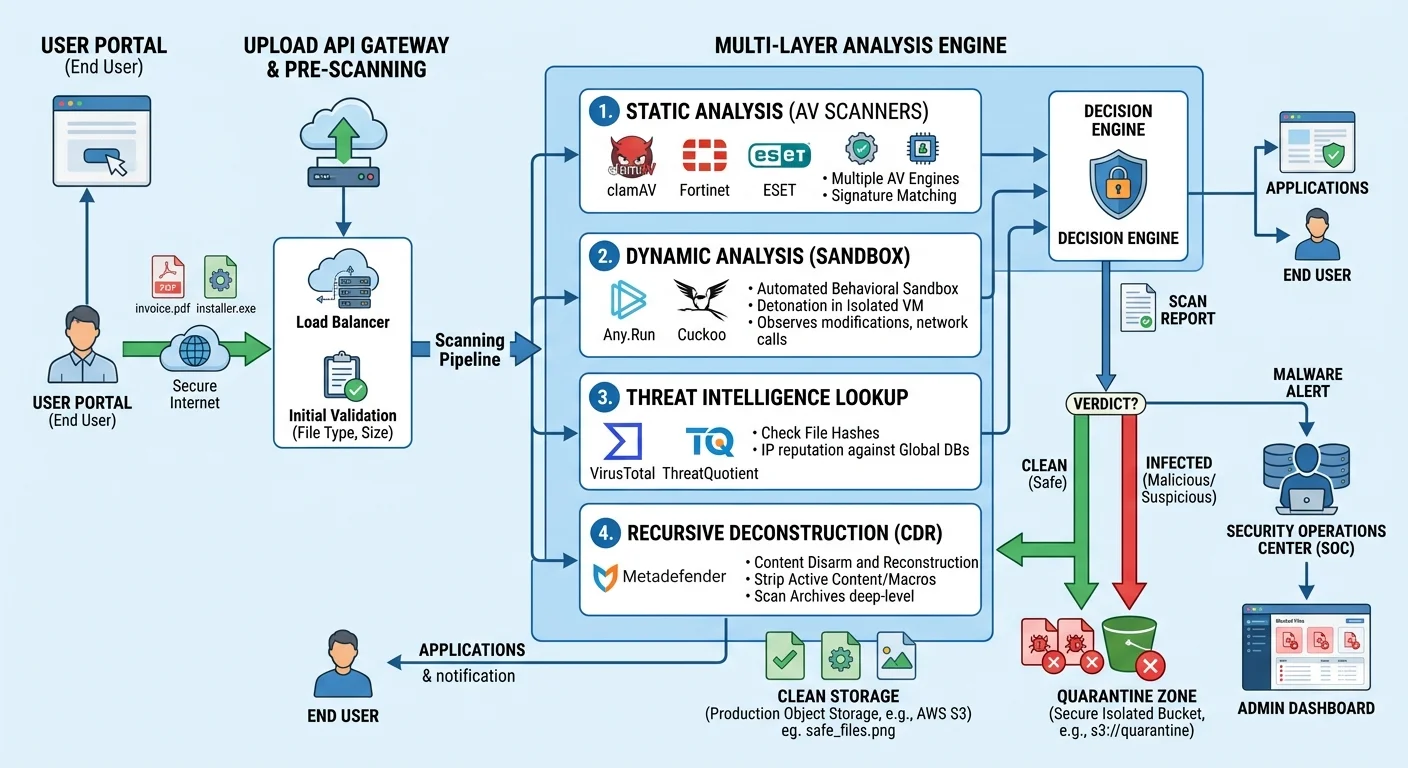
A production-grade scanning pipeline should combine at least three detection methods. Start with signature-based scanning for speed and coverage of known threats. Add heuristic or static analysis to catch suspicious file patterns that signatures miss, such as obfuscated macros or unusual file structures. Then layer in behavioral analysis through sandboxing for high-risk file types like executables, Office documents with macros, and PDFs with embedded JavaScript. This tiered approach balances throughput with detection depth.
Your choice of malware detection tools matters significantly. Open-source options like ClamAV provide solid signature-based scanning but lack advanced heuristics. Commercial multi-engine scanners aggregate results from dozens of antivirus engines, dramatically increasing detection rates at the cost of latency and expense. For many teams, a scanning API service like VirusScanner offers the right balance: purpose-built for upload workflows, with multiple detection layers accessible through a single integration point.
Scan files asynchronously using a queue system so upload latency does not degrade user experience.
Integration and Monitoring
Integration points matter as much as the scanner itself. Place your scanning layer between the upload endpoint and permanent storage. Files should land in a quarantine zone first, get scanned, and only move to production storage after passing all checks. This prevents any window where unscanned files are accessible. If your architecture uses object storage like S3, trigger scanning via event notifications on object creation rather than polling.
Monitoring and alerting complete the pipeline. Track metrics like scan throughput, average scan duration, detection rates by file type, and false positive rates over time. Set alerts for sudden spikes in malicious file detections, which could indicate a targeted attack against your platform. Log every scan result, including clean files, to maintain an audit trail. This data feeds back into tuning your detection rules and justifying security investments to stakeholders.
File malware scanning is not a luxury feature or a nice-to-have checkbox. It is the minimum viable defense for any application that accepts uploads. The attackers are not slowing down, and neither should your scanning infrastructure. Regular testing, where you deliberately upload known test malware like EICAR strings, confirms your pipeline is functioning correctly. Build scanning into your CI/CD pipeline validation as well, so infrastructure changes do not accidentally disable protections.
Frequently Asked Questions
?How do I add file malware scanning to an existing upload endpoint?
?Is heuristic analysis slower than signature-based scanning?
?How often do signature databases need updating to stay effective?
?Does scanning PDFs and Office files for scripts catch all macro-based attacks?
Final Thoughts
File malware scanning is the practice of intercepting, analyzing, and classifying uploaded files before they can cause harm. It combines signature matching, heuristic analysis, behavioral sandboxing, and increasingly machine learning to catch both known and novel threats.
No single method is sufficient on its own. Building a layered scanning pipeline, integrating it properly into your upload workflow, and actively monitoring its performance will keep your applications and users significantly safer.
Disclaimer: Portions of this content may have been generated using AI tools to enhance clarity and brevity. While reviewed by a human, independent verification is encouraged.